
Review existing relationships
See the primary keys, foreign keys, and table connections already available from your database metadata.
Relationship discovery
Review the connections already defined in your database, investigate disconnected tables, and validate evidence-based relationship candidates. Confirmed suggestions become workspace context for multi-table SQL without altering your database.
Evidence before confirmation
SQL Mocker keeps database-defined relationships separate from suggested connections. For disconnected tables, Investigate Relationships compares returned metadata and explains the structural evidence behind each candidate before you decide what to add.
See the primary keys, foreign keys, and table connections already available from your database metadata.
Generate database-specific investigation SQL and analyse the returned structural evidence for possible connections.
Optionally add aggregate data evidence, then confirm only the suggested relationships that match your schema knowledge.
Investigation workflow
Extract, upload, or manually build the tables, columns, keys, and relationships you want to use.
Review database-defined connections and identify tables that remain disconnected.
Select Investigate Relationships, run the generated script in your database, and return the results for analysis.
Review structural and optional aggregate data evidence, then confirm or reject each suggested relationship.
Feature walkthrough
Follow an Oracle example from disconnected tables through structural analysis, optional aggregate data validation, and confirmation of suggested relationships.
Watch the relationship investigation demo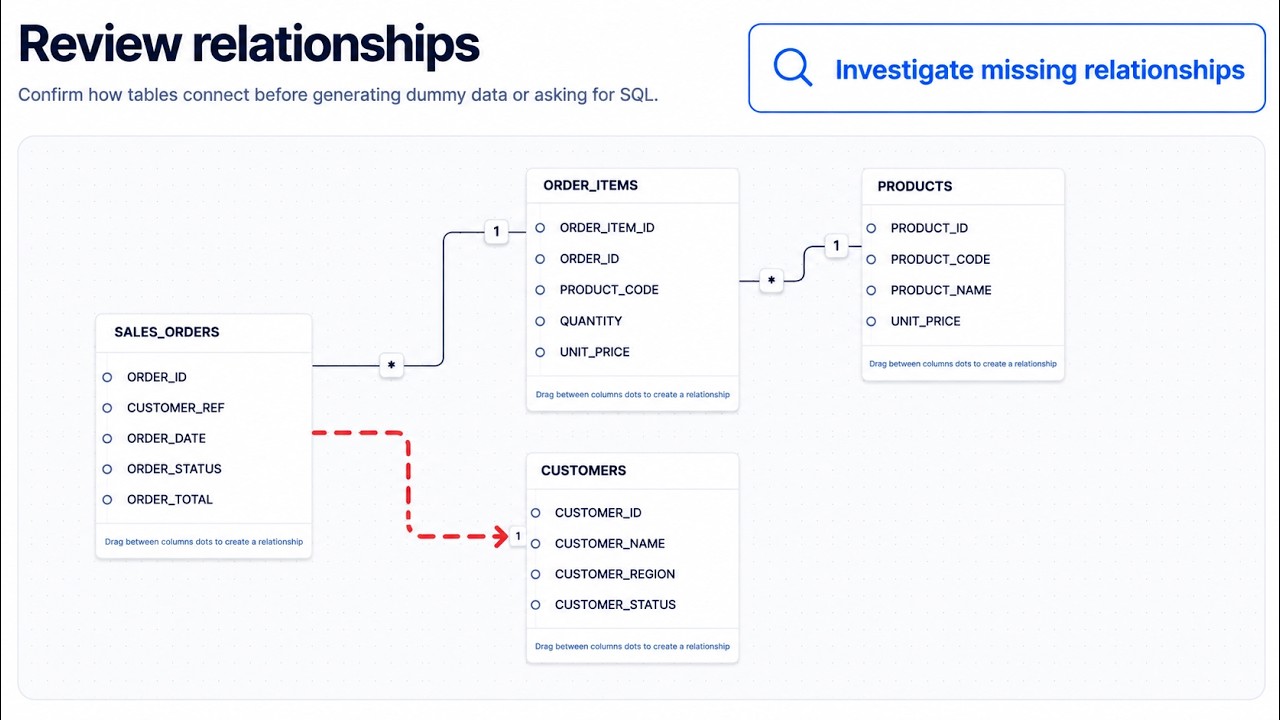
Workspace only
Added or corrected relationships are saved as context in your SQL Mocker workspace. They do not create foreign keys, modify tables, or change any relationship in your actual database.
Add your schema, review its existing connections, and investigate the tables that remain disconnected.